
Why Your Computer Needs a Cooling Checkup (Every Year or Two)
By The Computer Solution · July 1, 2026
TL;DR
- Your computer has a cooling system, fans, copper heat pipes, and thermal paste, that keeps its hottest parts from cooking themselves.
- Over a year or two, dust, pet hair, and smoke clog the fans, and the thermal paste dries out. Both trap heat.
- Trapped heat makes your computer slow down, shut off without warning, and wear out years early.
- A cooling checkup is a hardware service (different from a software tune-up): we clean it out, replace the paste, and stress-test to prove it’s cooling again.
- Flat $127 on its own, or $100 added to another service.
- Most people need it every 1 to 2 years; more often with pets, smoke, dust, or heavy use.
Your computer has a cooling system, and just like the one in your car, it needs attention now and then. Most people never think about it, right up until the day the fan starts running so hard it sounds like a jet taking off. That noise is your computer asking for help.
What the cooling system actually is
Inside every laptop and desktop, a small fan or two and a set of copper heat pipes pull heat away from the parts that run hottest, the processor and the graphics chip. A thin layer of paste, called thermal paste, sits between those chips and the metal, and it’s what carries the heat across so the fan can push it out the vents. When all of that is clean and fresh, you never notice it. When it isn’t, everything suffers.
What we find when we open one up
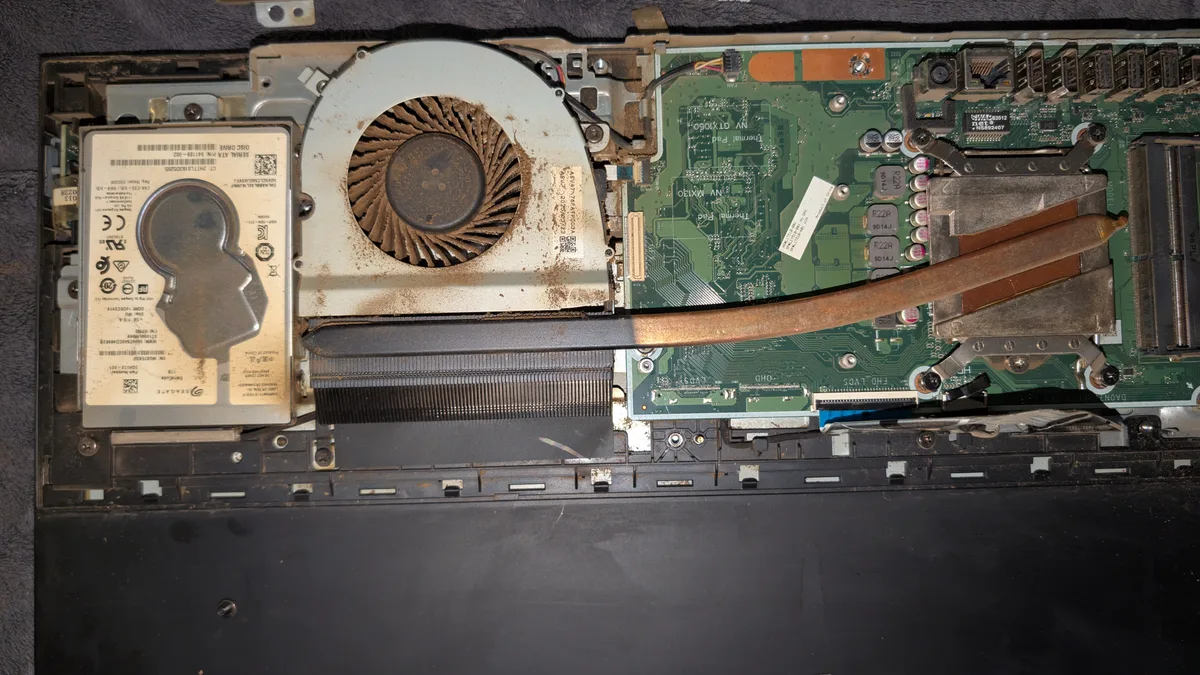
When someone tells me "the fan just gets going so fast," I usually have a good guess what’s waiting inside. We open it up, and here’s the culprit nearly every time: a fan and vents choked solid. I’ve pulled out fans caked in a brown felt of tobacco tar, fans packed thick with dog and cat hair, and fans buried under dust so dense it looks like carpet (the photo up top is a real one off my bench). The fan is spinning its heart out, but almost no air is getting through, and that is exactly why the machine runs hot, gets loud, and slows to a crawl.
Why it matters
Here’s why you don’t want to let it go. When a computer can’t get rid of its heat, it protects itself by slowing down, so that mysterious "why did it get so sluggish" feeling is often just heat. It can shut off in the middle of what you’re doing, with no warning. And worst of all, sustained heat is one of the fastest ways to wear out the most expensive parts in the machine: the processor, the graphics chip, and the battery. A computer that should have lasted eight years can cook itself in four. We clean and repaste it so that yours stays fast, quiet, and cool, and lasts the years you actually paid for.
What a cooling checkup actually involves
This is a hardware service, not a quick dusting, and here’s exactly what happens, step by step, so you know precisely what you’re paying for:
- We take the cooling system apart. We carefully lift off the heat sink, the metal-and-copper piece that sits on top of the hot chips, so we can reach everything underneath. Nothing gets properly cleaned or fixed while it’s buried, so this has to come first.
- We remove the old, dried-out thermal paste. That thin layer between the processor and the metal has usually gone hard and crumbly, like old caulk, and once it dries out it stops carrying heat. We clean every bit of the old paste off, so the fresh layer has a clean surface to grip.
- We apply fresh thermal paste (and new thermal pads if yours need them). We lay down a new, precise layer of paste, and replace the little silicone pads on the other hot chips if they’re worn out. This paste is the bridge that actually pulls heat off the processor, so getting it right is the difference between a cool machine and a hot one.
- We clean out the fans and the vents. This is the big one. We clear the fan blades and the vents of everything clogging them, the dust, the hair, the sticky tar, so air can finally move freely again and the fan can do its job without screaming at full speed.
- We put it back together properly. We seat the heat sink back down evenly onto the fresh paste and reconnect everything, so it makes solid, even contact with the chips. A heat sink that isn’t seated right cools worse than one that’s simply clean, so this step matters more than it sounds.
- We stress-test it to prove it’s fixed. This is the part most shops skip. Instead of closing it up and hoping, we run your computer hard on purpose and watch the temperatures, so we can confirm it’s genuinely running cool again before it goes home. You get proof, not a guess. That’s the verification, and it’s why this is a real hardware service and not just a cleaning.
It’s not the same as a tune-up
One thing worth being clear about: this is different from a Performance Optimization. That’s a software service, cleaning up what’s slowing Windows down on the inside. A cooling checkup is hardware, the physical cleaning and repasting of the machine itself. A slow computer can be either problem, or both at once, which is exactly why we check before we charge, so that you pay for the fix you actually need and not the one you don’t.
How often, and who needs it more
For most people, once every 1 to 2 years keeps a cooling system healthy. You’ll want it more often if any of these sound like you: you have pets, someone smokes near the machine, it lives somewhere dusty, or you push it hard with gaming, architecture or design work, 3D rendering, or video editing. Those computers pull far more air through the fans, and far more junk right along with it. (Between checkups, keeping the outside vents clear helps, see our safe cleaning guide.)
What it costs
A cooling checkup is a flat $127 on its own, or $100 when you add it to another service. And if you’re not sure whether yours needs it, the assessment is free, so there’s no risk in having me take a look. Call The Computer Solution and we’ll find out exactly where your machine stands.
Got a computer problem in Durango?
Free assessment, honest answers, you only pay when it’s solved.