
Swollen or Dying Laptop Battery?When It’s Time to Replace It
By The Computer Solution · July 10, 2026
TL;DR
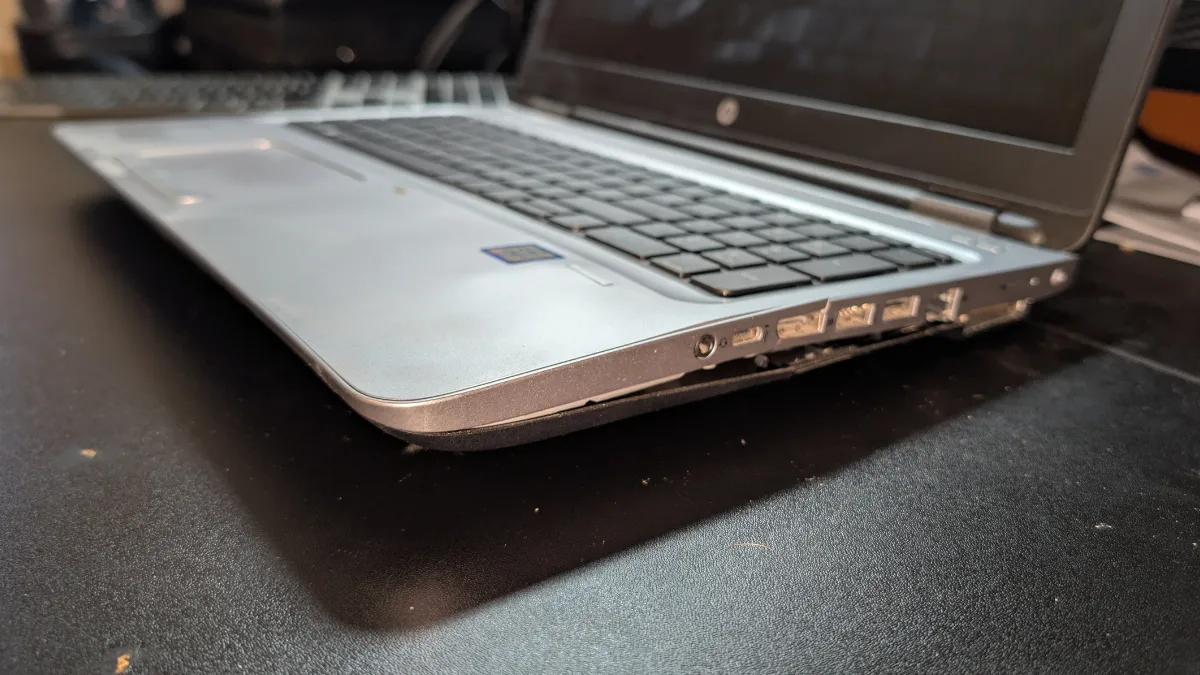
- A dying battery is annoying. A SWOLLEN battery is a safety issue, it’s under real pressure and needs to come out.
- If it’s swelling: power the laptop off, stop using it, keep it out of heat, and bring it in. Don’t press on or puncture it.
- Sure signs it’s the battery: the case bulges, the keyboard/trackpad lifts, it won’t sit flat, it dies the second you unplug, or it shuts off with charge to spare.
- What often ISN’T the battery: "plugged in but won’t charge" (usually the port or charger) and "won’t power on at all."
- We confirm it’s the battery first, a health report plus a physical look, so you never pay to replace the wrong part.
- On a good laptop, a fresh battery is one of the cheapest ways to add years. The assessment is always free.
A worn-out laptop battery is a nuisance, you’re tied to the wall, or it dies the second you unplug. A swollen battery is something else entirely: a safety issue you shouldn’t sit on. The good news is that both point to the same fix, a fresh battery, and telling which one you’ve got is easy. Here’s how to read the signs, what to do right now if it’s swelling, and how we make sure it’s actually the battery before you spend a dime.
If your battery is swelling, do this now
A swelling battery is under an immense amount of pressure, and that pressure is a real safety risk. This isn’t a wait-and-see situation. Power the laptop off as soon as you can and stop using it. Don’t press on it, poke it, or try to pry the battery out yourself. Keep it out of heat, no hot car, no sunny windowsill, because heat only makes it worse. Then bring it in (or give us a call) so the battery can be removed and replaced safely. The sooner a swelling battery comes out, the better.
How to spot a swollen battery (no tools needed)
A swelling battery pushes on everything around it, so you can catch it just by looking. The tells:
- The laptop won’t sit flat on a desk, it rocks or wobbles.
- The lid won’t close flush to the case anymore.
- The keyboard or touchpad is being pushed up from the case.
Any one of those means the battery is swelling, and that’s the safety situation in the box above.
The other signs it’s the battery
Not every worn-out battery swells. Plenty just quietly give up. It’s likely the battery when your laptop:
- Drains far faster than it used to.
- Dies the moment you unplug it.
- Shuts off unexpectedly even with charge to spare (say, 40 to 50 percent).
- Pops up an operating-system warning like “consider replacing your battery.”
What looks like a battery problem, but often isn’t
Here’s where we’ll save you from paying for the wrong part. Two things get blamed on the battery when they’re usually something else, so it helps to know the difference before you assume:
| Likely the battery | Often something else |
|---|---|
| Case bulging; keyboard or trackpad lifting; won’t sit flat; lid won’t close flush | Plugged in but won’t charge, often the charging port or the charger, not the battery |
| Drains fast, or dies the moment you unplug it | Won’t power on at all, even plugged in, which can be more than just the battery |
| Shuts off with charge to spare (40 to 50 percent) |
So a dead-seeming laptop isn’t automatically a battery. If yours is plugged in and won’t charge, that’s a different chain worth reading, see why won’t my laptop charge. Either way, we check before we recommend a part.
How we confirm it’s actually the battery
Before we ever recommend a battery, we make sure it’s the battery, in two steps. First, we run a battery health report with professional tools that shows the battery’s real condition, not a guess. Second, we pull the bottom panel and physically look at the battery for any sign of swelling. And if a laptop won’t power on at all even while plugged in, that tells us it might be more than the battery, so we keep digging rather than throw a part at it. You get the honest answer either way.
Is it worth replacing, or is it time for a new laptop?
Every laptop that comes in gets a full assessment, not just a battery check. We look at the whole machine and give you our honest, professional read on where it stands and what a repair would take. On a laptop that’s otherwise running well, a fresh battery is one of the cheapest ways to add years of life, far less than a new computer. If the machine is already slow or aging, we’ll give you the straight math instead of selling you a battery for a computer near the end of its road. That’s the same honest framework in repair or replace your computer.
What it costs, and the promise around it
The price is simple: the cost of your specific battery, plus the labor to install it. The battery itself usually runs from about $25 to $150 depending on your model, and labor is quick on most laptops (a bit more involved on glued-in ones like a MacBook). You get a firm price up front. The assessment is always free, you only pay once the work is done and the results are in (parts ordering aside), and we charge the new battery to full and verify it actually holds before your laptop comes back. Full details are on the laptop battery replacement page.
The bottom line
A dying battery quietly steals your portability. A swelling one is a safety risk you shouldn’t ignore. Either way, the fix is affordable and quick once we’ve got the right battery in hand. If your case is bulging, or your laptop dies the second you unplug it, bring it in, the assessment is free, and you’ll leave knowing exactly what’s going on. And once you’ve got a fresh battery, here’s how to make it last.
Condition your new battery
Whether you replace the battery or move to a whole new laptop, you’ve got a fresh battery, and it’s worth a few minutes to condition it. A new battery and the laptop’s controller don’t yet agree on exactly where “full” and “empty” are. Calibrating once at the start teaches the controller the true limits, so your charge percentage reads accurately and you get the most life out of the new battery from day one. Here’s how:
- Charge to 100%. Plug in your laptop and charge it all the way to 100%. Once it’s full, leave it plugged in for another 1 to 2 hours to make sure the upper limit is fully recorded.
- Discharge completely. Unplug the charger and use your laptop normally, browse the web, work, watch videos, until the battery drains and the computer turns itself off.
- Let it sit. Leave the laptop in its powered-off state for 3 to 5 hours. This allows the battery controller to reset its old data.
- Recharge to 100%. Plug the charger back in and allow the laptop to charge uninterrupted all the way back to 100% before you turn it on.
Free printable conditioning checklist
The full step-by-step, with boxes you can tick on screen or print and check off by hand.
Got a computer problem in Durango?
Free assessment, honest answers, you only pay when it’s solved.