
Why Is My Computer So Slow?And Why Reinstalling Windows Won’t Fix It
By The Computer Solution · July 5, 2026

TL;DR
- A slow computer usually isn’t a virus, and reinstalling Windows won’t fix it.
- Computers slow down because of hardware that can’t keep up: an old or low-end processor, not enough memory, an old mechanical hard drive, or a failing drive.
- The single biggest speed jump for most people is swapping an old mechanical hard drive for an SSD.
- The honest first step is checking Task Manager to see what’s actually maxed out (CPU, Memory, or Disk) before touching any software.
- What helps: a flat $127 optimization if it’s genuinely software, an SSD or memory upgrade if it’s the hardware, or an honest repair-vs-replace call if the machine has aged out. The assessment is free.
"My computer is so slow" is probably the most common thing I hear, and it almost always comes with a guess attached: it must have a virus, or it just needs Windows reinstalled. Here’s the honest truth after twenty years on the bench: it’s usually neither. A slow computer is almost always a hardware problem, and knowing that saves you from paying to fix the wrong thing.
First, two myths worth killing
"It must be a virus." A computer can absolutely have a virus and be slow, but those are often two completely unrelated things. Slowness is rarely the virus’s doing. In fact, what looks like an infection is almost never actually one, which is why we diagnose instead of assume.
"Just reinstall Windows and it’ll be fast again." A reinstall gives you a clean software slate, and on a machine that’s genuinely gummed up with software junk it can help. But if the real problem is hardware, and it usually is, a reinstall does nothing. You’ll go through the whole ordeal of wiping and restoring your computer only to watch it crawl right back to where it was, because the thing holding it back was never the software.
The real reason computers get slow: hardware that can’t keep up
A computer feels slow when one of its parts can’t keep pace with what you’re asking it to do. There are four usual suspects:
- An old or low-end processor (CPU). The brain of the machine. A budget or aging processor simply can’t crunch through modern software as fast, and no software trick changes that.
- Not enough memory (RAM). Memory is your computer’s workspace. When it runs out, everything bogs down, especially with a lot of browser tabs or several programs open at once. More memory doesn’t make a computer "faster" so much as it stops it from grinding to a halt under load.
- An old mechanical hard drive. This is the big one. If your computer still has a spinning mechanical drive instead of a solid-state drive (SSD), that single part is very likely the biggest thing dragging it down. Swapping it for an SSD is the most dramatic speed improvement most people ever feel.
- A failing drive. A drive that’s starting to fail can make a whole computer crawl before it dies. If that’s what we find, backing up your data comes first, see what a won’t-boot screen really means for why that matters.
The honest first step: look at Task Manager
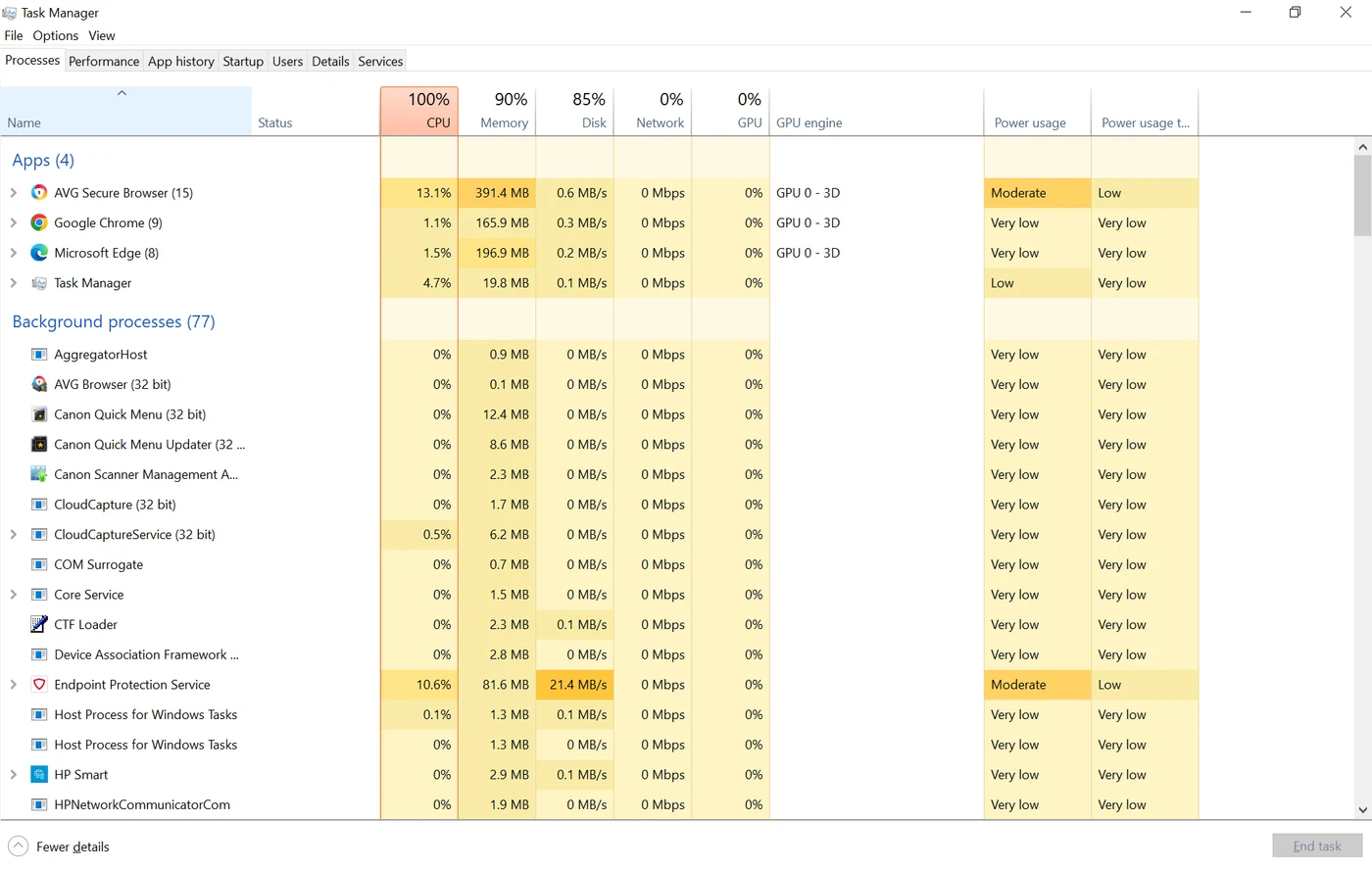
Here’s the part most places skip, and it’s the whole game. Before I ever recommend a software fix, I open Task Manager and watch what the hardware is actually doing. It shows you, in plain numbers, whether the CPU, the Memory, or the Disk is pinned at 100 percent while the machine struggles. That one look tells you which part is the bottleneck, so the fix targets the real cause instead of guessing. Diagnosing before spending is exactly why the assessment here is free, you find out what’s actually wrong before you risk a dollar.
What actually fixes it
Once we know what’s bottlenecked, the fix is specific (and if you’re weighing an SSD against more memory, here’s how to tell which upgrade you need):
- If it’s an old mechanical drive: an SSD. The biggest bang for your buck by a mile. It’s the price of the drive, based on the capacity you need, plus about $70 to clone your data over and install it. Boot times and program launches go from a coffee-break to a couple of seconds.
- If it’s memory: a RAM upgrade, when your machine allows it. This one genuinely depends on your computer. Many newer laptops have the memory soldered to the board, which means it can’t be upgraded at all. Most computers have accessible memory slots and swap easily, so the labor is minimal. A few, like certain older iMacs, require pulling the entire logic board to reach the slots, and that depth of work runs up to around $200. The cost of the memory itself is honestly a "it depends" right now, chip prices are volatile, and it hinges on how big an upgrade you want and how old the machine is (older DDR3 is aging out, while DDR4 and DDR5 are today’s standard and both are pricey). We identify your exact machine and quote it up front.
- If it’s genuinely software: an optimization. When Task Manager shows the hardware isn’t the problem, a performance optimization clears the junk and fixes the bottlenecks. It’s a flat $127, even if it takes hours, and you’re only invoiced once your computer is actually running better.
- If the machine has simply aged out: the honest math. Sometimes the processor is just too old to keep up and no upgrade is worth it. We use a straight rule to decide, roughly $150 per year of added life, laid out in repair or replace your computer, so you never sink good money into a machine that’s done.
The bottom line
A slow computer is a symptom, not a diagnosis. Before you assume it’s a virus or resign yourself to buying a new machine, the real question is which part can’t keep up, and that’s a five-minute look at Task Manager, not a guess. Most of the time it’s an old drive begging to be an SSD, and the fix is faster and cheaper than people expect. Bring it in, the assessment is free, and you’ll leave knowing exactly what your computer needs and what it doesn’t.
Got a computer problem in Durango?
Free assessment, honest answers, you only pay when it’s solved.