
Your Keyboard Is Dirtier Than a Toilet SeatHow to Safely Clean It
By The Computer Solution · July 18, 2026
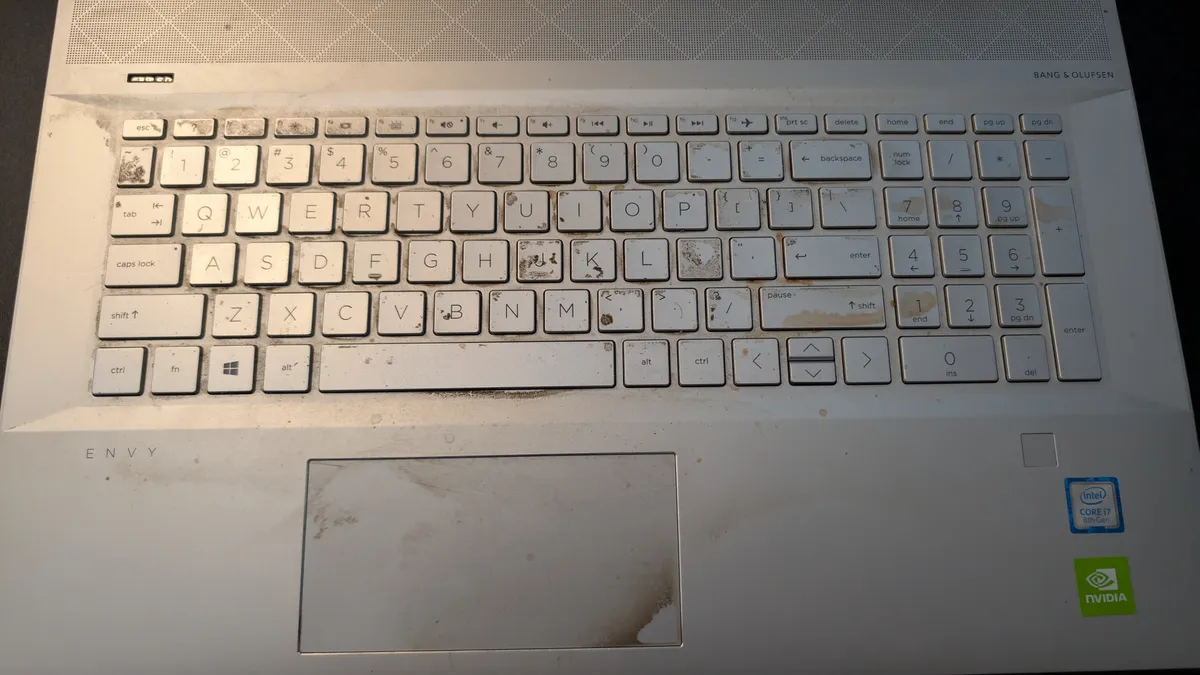
TL;DR
- That photo is a real client’s keyboard from last month. It is very likely dirtier than a toilet seat, and there’s science to back that up.
- Microbiologist Dr. Charles Gerba found the average desk can carry up to 400x more bacteria than a toilet seat, mostly because toilets get cleaned and keyboards don’t.
- What’s on there: sweat, dead skin, food crumbs, and hand oils, an all-day buffet for bacteria.
- Safe cleaning: power fully OFF, put an isopropyl screen cleaner on a soft cloth (never on the computer), wipe gently, repeat.
- The one mistake that kills computers: spraying or pouring liquid straight onto the machine.
That photo up top is real. It’s a client’s laptop that came across my bench last month, and no, I didn’t stage it. It isn’t just dirty, it’s practically a science experiment. And here’s the part that’ll make you look at your own keyboard a little differently: it’s very likely dirtier than a toilet seat. I’m not being dramatic. There’s actual science behind that.
Wait, dirtier than a toilet seat? Really?
Really. Microbiologist Dr. Charles Gerba at the University of Arizona has found that the average office desk can carry up to 400 times more bacteria than a toilet seat, and consumer testing groups like Which? have found individual keyboards packed with germs. The reason is almost funny once you hear it: your toilet seat gets cleaned and disinfected on the regular. Your keyboard? Basically never. Toilets get scrubbed. Keyboards get ignored for years.
What’s actually living on there
So what makes a keyboard like the one above so grim? Mostly sweat and dead skin. If you’ve ever gone a few days without a shower, you know sweat and dead skin turn greasy, stinky, and gross, and they breed bacteria like crazy. Add the crumbs from lunch and the oil off your fingertips, and your keyboard becomes an all-day buffet for microbes, the kind with names like E. coli and Staph. And let’s be honest about the other thing: plenty of people don’t wash their hands after a bathroom trip, then go right back to typing. A keyboard that has never once been cleaned ends up dirtier than the toilet itself, because at least the toilet gets wiped down.
How to safely clean it yourself
The good news is that cleaning it is cheap and simple, as long as you do it right. Here’s the safe way:
- Power all the way OFF. Not sleep, not hibernate, a full shut down. This one matters.
- Get an isopropyl-alcohol-based cleaner (a “screen cleaner”). The higher the alcohol content, the better, your keyboard isn’t driving anywhere.
- Put the cleaner on a soft cloth, never on the computer. This is the big one (more on that in a second).
- Wipe the keys and mouse firmly enough to work the grime loose, but not so hard that you snap a key or pry off a keycap.
- Repeat until it looks the way you want.
For the full step-by-step on the rest of the machine, see my guides on how to safely clean your laptop and your yearly computer spring cleaning.
The one rule that saves computers
Cleaner goes on the cloth, never on the computer. Spray or pour liquid straight onto a laptop and it can seep down onto the motherboard and fry it. You’d be cleaning your way to a dead computer. Dampen the cloth, then wipe the machine.
The don’ts (how a dirty keyboard becomes a dead one)
A few hard rules, because I’ve watched good intentions kill perfectly good computers:
- No kitchen cleaners, no bathroom cleaners, and nothing with bleach or ammonia (and never, ever mix those two, that combination makes toxic gas, which is a people problem, not just a computer one).
- Only ever use an isopropyl-alcohol-based screen cleaner.
- Never apply the cleaner directly to the computer. It leaks inside, reaches the motherboard, and fries it.
- Never soak it. It’s a computer, not a submersible.
Do you have to clean it yourself? No, but here’s the honest deal
If a computer comes to me as far gone as the one in that photo, there’s a $27 cleaning fee, because scrubbing down a machine that grimy is a genuinely unpleasant job. But I’ll be straight with you: I’d honestly rather you keep the $27. If you give it a careful wipe-down yourself before you drop it off, using the safe method above, you save the fee and I get to work on a machine that isn’t, well, that. A quick clean at home beats paying me to deal with it, and everybody wins.
The bottom line
Your keyboard is one of the dirtiest things you touch all day, and most people never give it a thought. A quick, careful wipe-down keeps it from becoming a petri dish, and keeps it working longer too. Do it the safe way, cleaner on the cloth and gentle on the keys, or bring it to me and I’ll handle the whole machine.
Got a computer problem in Durango?
Free assessment, honest answers, you only pay when it’s solved.