
Your Mac Cannot Find Your Printer,and There Is No Setting to Fix It
By The Computer Solution · October 14, 2026
TL;DR
- Your Mac is fine and your printer is fine. The router is deciding they can’t see each other.
- Apple devices find printers one way, Windows finds them another, which is why one works and one doesn’t.
- Reboot the router and watch: if the printer shows up for ten seconds and vanishes, that’s your answer.
- There’s no setting to change, because the provider removed the page the setting lives on.
- What fixes it’s a different router, and I will say so rather than keep charging you to try things.
The call I got five times
Between early September and the middle of October I was called out to five homes and offices in Durango for the same thing. An iMac or a MacBook, sometimes an iPad as well, that could no longer see or find the printer. Three different printer brands. Nothing in common on the Apple side, aside from the fact they were all Apple devices. Nothing in common on the printer side at all.
In two of those homes there was a Windows laptop sitting in the same room, printing to the same printer, perfectly happily. That’s the detail that tells you something strange is going on, and it’s also the detail that makes people doubt themselves. If the printer works, and the Wi‑Fi works, and the other computer works, then surely the Mac is broken.
The Mac wasn’t broken. Not once in five visits.
Why Apple and Windows disagree about where your printer is
When your Mac looks for a printer, it doesn’t know exactly where to look, so it calls out to every device connected to your network all at once and asks the question out loud: “Is there a printer here?” If there’s a printer able to be found connected to the network, it responds. Apple calls this Bonjour. Your iPhone and iPad use it too, and it’s why adding a printer on an Apple device is usually so easy there’s nothing to describe.
Windows, for the most part, doesn’t work that way. It tends to go looking at a specific address it already knows about.
Two different methods, two different dependencies. When a router stops passing along the broadcast kind of message, every Apple device on that network loses the only way it has of finding the printer. Windows never used that method, so Windows never notices anything changed.
Pro Tip
The two-minute test that ends the guessing
This is the part I wish I’d known in early September, and it costs you nothing to run.
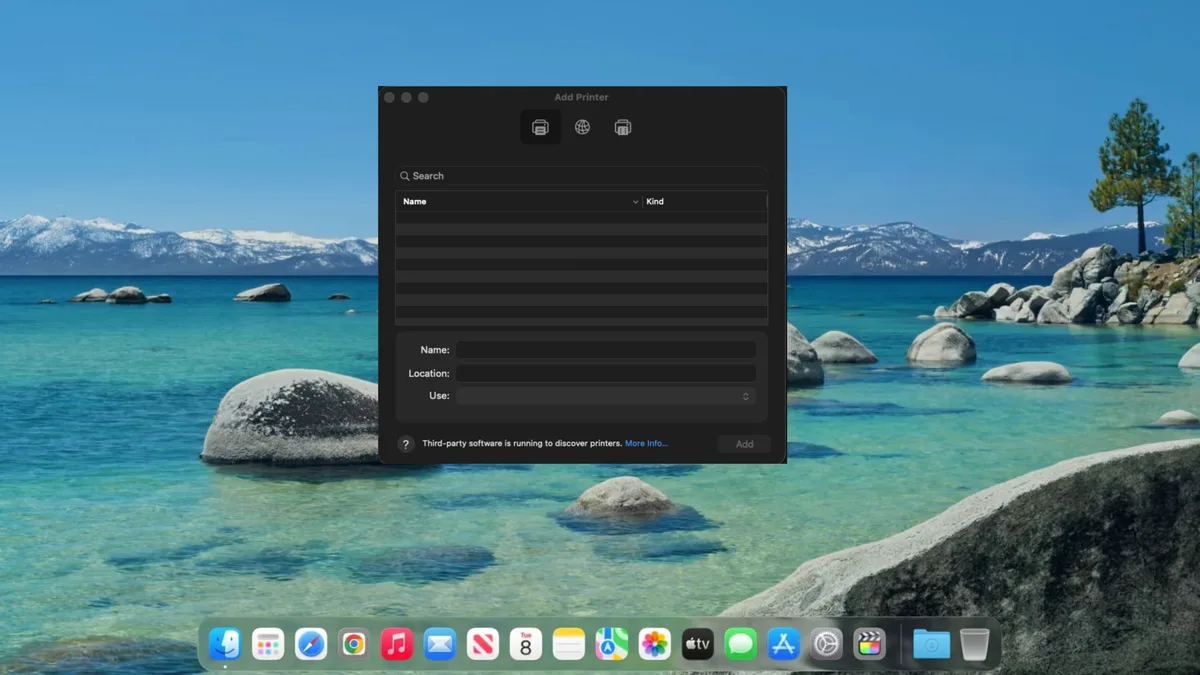
Open the Add Printer screen first, before you touch the router. On your Mac that’s System Settings, then Printers & Scanners, then the Add button. Leave that window open and searching. The window you’re watching has to already be up and looking, because the thing you’re about to see only lasts about ten seconds and nobody navigates three screens that fast.
Now, with that window still open in front of you, unplug your router. Wait about ten seconds and plug it back in. Then just watch the list.
If your printer appears in that list for a handful of seconds and then disappears on its own, you’ve got your answer and you can stop. The router is doing it.
Here’s why that works, and it’s worth understanding because it explains the whole problem. A router that has just started up hasn’t yet worked out what’s on your network. It has no list, so it has nothing to filter against, and for those few seconds it passes everything through to everything. Your Mac asks its question, the printer answers, and there it’s on the screen.
Then the router finishes building its list. It decides the printer's announcements aren’t something it needs to pass along. And your printer drops off the screen while you’re looking at it.
Five sites. Same ten seconds. Every time.
The part that makes people angry, and I understand why
On every one of those five visits, the router was the one the internet service provider supplied. Not a router anybody chose, not one anybody bought. The one that turned up with the service and got plugged in, which is the case in most houses I walk into.
Normally, when a router is doing something you want it to stop doing, you type the router's address into a web browser, you get a settings page, and you change the settings. That’s how it has worked for over 20 years.
On these new units, that settings page is now gone from the browser. Typing the router's address no longer brings up any controls. It brings up a code that points you to the provider's phone app, and the app doesn’t permit the customer to change more advanced settings about the router.
So this isn’t a case of a setting being hard to find, or buried, or needing a password nobody has. The control is unreachable. Not by you, not by me, and not by a tech-support agent, because the agent on the other end of that call has no more access to it than you do.
What actually works
You need a different router that you will own instead of rent. I’ve gone looking for a better answer five times now and there isn’t one.
In practice this means putting a new, third-party router in charge of your network. Don’t worry, your internet service won’t change on you. Your monthly bill might change, and in your favor: if you return the router you’ve been renting, your bill may actually go down. What changes is which router decides whether your Mac is allowed to find your printer, and it becomes a router you own.
Once that’s done, the problem doesn’t come back. That’s the part worth paying for. Every other approach I tried bought a few days and then the phone rang again.
If this sounds like your house
Run the ten-second test first. It costs you nothing and it either confirms this is your problem or rules it out completely, and both of those are useful.
If the printer appears and vanishes, you now know more about your own network than most people who will try to help you with it. And if it doesn’t, then you’ve a different problem, and the more common reasons a printer goes offline are a better place to start.
If you would rather just have it working
On-site printer setup is a flat $127: I install the printer on every computer in the house and verify that network printing and scanning both work. Fifteen minutes or a full hour, same price, no clock running, so you’re free to ask more questions.
Network work is a different job and I price it per job, not at that flat rate, because a house with one router and a house with three access points aren’t the same afternoon. If a replacement router is the answer, I will quote the work and the hardware before anything is bought.
And if I look at it and conclude your problem is something else entirely, I will tell you that instead. Sending you to buy a router you didn’t need would be worse than doing nothing.
Got a computer problem in Durango?
Free assessment, honest answers, you only pay when it’s solved.